What Is Quishing? QR Code Phishing and How to Avoid It
Quishing is phishing with QR codes: a code in an email, or a sticker over a real code on a parking meter or poster, leads to a fake website that asks for a password, card details or a payment. This guide explains how quishing attacks work, how to spot one, and what to do after a bad scan.
By the Barcode.codes editorial teamReviewed
What Quishing Means
Quishing, QR phishing, is phishing that hides the link in a QR code: the code leads to a fake website that asks for a password, card details or a payment.
Why Criminals Use QR Codes
The UK NCSC gives three reasons. People have learned to distrust strange links in emails, but a QR code hides the link; not every email security tool reads images; and people scan with their personal phone, which may lack the protections of a work computer.
What a Quishing Site Is After
- Logins: usernames and passwords for email, bank or work accounts.
- Card and bank details: typed into a fake payment page.
- Payments: for a fake service or fine, or a real payment sent to the criminal.
- The phone itself: the FBI warns that a malicious code may contain embedded malware that gives access to the phone, its location and personal and financial data.
How a Quishing Attack Works
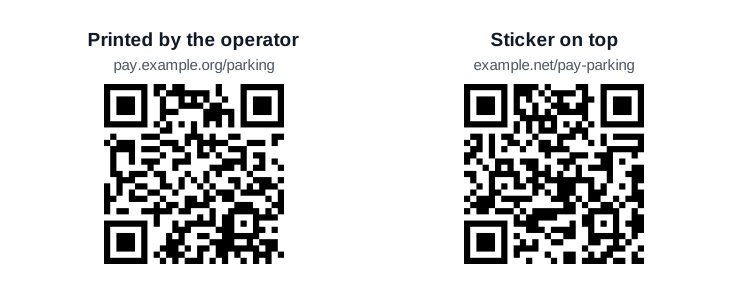
NCSC Ireland describes two main methods: a QR code sent by email, and a fake code stuck over a real one in a public place.
QR Codes in Emails
A phishing email carries a QR code in its text or in an attached document, sometimes with a reason to scan now, such as a payment that failed. The UK NCSC reported an increase in these attacks; the FBI advises calling the company on a number you find yourself, not one from the email.
Stickers Over Real Codes
Criminals place their own code over the real one where many people pay or order: parking payment points, restaurants, posters and leaflets. The UK NCSC considers codes in open spaces such as stations and car parks riskier than the codes in pubs and restaurants, which it calls probably safe.
How to Spot a Quishing Scam
Read the link before you open it, and be suspicious of a sticker, a hurry or a request for more information than the task needs.
- The link: the FBI says to check the URL after scanning: a fake domain can differ from the real one by a typo or a misplaced letter.
- A sticker: a code stuck on top of another one, or not behind glass or on a screen, may have been tampered with.
- Pressure: a demand to pay at once to avoid a fine or a cut-off is a common sign, NCSC Ireland says.
- Too many questions: a site or a follow-up call that asks for more than the task needs, such as a parking page asking for your bank login.
You can read a code without opening it: the QR code checker on this site decodes it in your browser and shows the full link with its registrable domain marked, without visiting the site.
QR code checker reads a QR code from a photo or the camera and shows where it leads, without opening it.
Which QR Scanner to Use
The agencies differ here: the FBI and the UK NCSC advise the scanner built into your phone's camera, while NCSC Ireland advises a trusted scanning app that warns about suspicious links.
- FBI: do not download a QR code scanner app, which adds the risk of malware; most phones scan with the camera app.
- UK NCSC: use the QR scanner that comes with your phone rather than an app from an app store.
- NCSC Ireland: use a trusted QR code scanning app that can block or warn about suspicious links, and look at the preview of the link.
All three agree on the step that matters most: look at the link the scanner shows before you open it.
What to Do If You Scanned a Quishing Code
Act fast: change the passwords you typed, call your bank, scan the phone for malware and report the scam to the police in your country.
- Change the password of every account you entered on the site, and of accounts that share it.
- Contact your bank if you entered card or bank details or paid, and ask how to secure the account.
- Run a full antivirus scan on the phone, as NCSC Ireland advises.
- Report it: in the United States, to your local FBI field office and to the FBI's Internet Crime Complaint Center at ic3.gov; in Ireland, to your local Garda station or phishing@ncsc.gov.ie.
The FBI notes that law enforcement cannot guarantee the recovery of money once it has been transferred, so report quickly.
Frequently Asked Questions
Is It Safe to Scan QR Codes in Restaurants?
The UK NCSC says codes in pubs and restaurants are probably safe, and codes in open spaces such as stations and car parks are riskier. In any place, check the link before you open it and look for a sticker over the code.
Can Scanning a QR Code Put Malware on My Phone?
The FBI warns that a malicious QR code may contain embedded malware that gives a criminal access to the phone, its location and personal and financial data. It also advises getting apps from your phone's app store, never from a QR code.
Should I Pay Through a QR Code?
The FBI advises avoiding payments through a site reached from a QR code and typing a known, trusted address instead. If you do pay, check the link and the site first.
How Is Quishing Different From Phishing?
Quishing is a kind of phishing: the trick and the fake website are the same, but the link is hidden in a QR code instead of written in the message. That lets it slip past people who check links and past some email filters.
Sources
The facts in this guide come from these sources, retrieved on October 9, 2026; where they differ, the guide says which agency recommends what.
FBI Internet Crime Complaint Center: Cybercriminals Tampering with QR Codes to Steal Victim Funds, public service announcement, January 18, 2022 describes tampered physical and digital QR codes and the FBI's advice; retrieved October 9, 2026.
UK National Cyber Security Centre: QR codes – what's the real risk?, February 8, 2024 explains why criminals use QR codes in phishing emails and where scanning is riskier; retrieved October 9, 2026.
National Cyber Security Centre Ireland: Quick Guide, QR Code Phishing & Scams, January 2025 defines quishing, its two main methods, the signs to check and the steps after a scam; retrieved October 9, 2026.
Related Barcode Guides
- What is a QR code?
How a QR code stores a link and how phones read it.
- QR code vs barcode
A 2D QR code compared with a 1D barcode.
- How to read a barcode
Reading the digits of a barcode by eye.
- Data Matrix vs QR code
The two 2D codes compared.