Code 128 Barcode Generator
Make a Code 128 barcode online for free. Type any text, numbers or symbols: the generator picks code sets A, B and C to keep the barcode as short as possible, shows which sets it used and how many modules wide the symbol is, and lets you force one set. Download SVG, PNG, PDF or EPS.
58.1 × 19.4 mm at 300 DPI
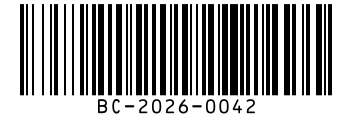
Scaled to fit. Actual size shows the print size on screen.
Print simulationNew
Shows how a worn print looks and tests it with the decoder.
Blue bars: the start, center and end guard patterns. Downloads stay in your chosen colors.
- Type
- Code 128 · 1D
- Print size
- 58.1 × 19.4 mm
- Raster
- 704 × 236 px
- Modules
- 156 wide
- GS1 prefix
- Read back
Download
Vector drawing, 58.1 × 19.4 mm. Design and label programs place it at its print size.
More export optionsNewTest sheet · size set · embed code
Print test sheet (PDF)
The code at 80%, 100% and 150% with 100 mm and 4 in rulers. Print it at actual size and scan each copy before printing many.
Size set (ZIP)
Magnification
DPI
Embed code
How to Create a Code 128 Barcode
Type your data, check the code sets and size under the field, and download the file.
- Type the text, number or code you want to encode, such as an order or asset number.
- Read the line under the options: it lists the code sets used and the symbol width in modules.
- Set the X-dimension and bar height for your printer and label, then check the print size.
- Download SVG, PNG, PDF or EPS and scan a test print before printing a batch.
Code 128 Code Sets: A, B and C
Code 128 has three code sets, and a symbol can switch between them to encode each part of the data in the fewest characters.
The Three Code Sets
- Code set A: capital letters, digits, punctuation and the control characters (ASCII 0 to 95).
- Code set B: capital and lowercase letters, digits and punctuation (ASCII 32 to 127).
- Code set C: pairs of digits from 00 to 99, so numbers take half as many characters.
Special Characters
- Code A, B and C: switch the code set for the rest of the symbol.
- Shift: switches between A and B for a single character.
- FNC1: in the first position marks GS1 data, as in GS1-128.
- FNC4: reaches Latin-1 characters such as ä and é.
Code 128 Specifications
These are the rules of the Code 128 symbology as described in the GS1 General Specifications and the encoder's reference.
| Property | Code 128 |
|---|---|
| Digits | Variable length; digits pack two to a symbol character in code set C |
| Characters | All 128 ASCII characters (code sets A and B), Latin-1 characters 128 to 255 through FNC4, and digit pairs 00 to 99 (code set C) |
| Check digit | One mandatory check character: start value plus each symbol character's value times its position, modulo 103; it is not printed in the text |
| Quiet zone | 10 modules left, 10 modules right |
| Symbol characters | 11 modules each (three bars and three spaces); the stop character is 13 modules |
| Function characters | FNC1 in first position marks GS1 data; FNC2 appends messages, FNC3 programs readers, FNC4 reaches Latin-1 |
| Standard | ISO/IEC 15417; GS1-128 is Code 128 with FNC1 and GS1 Application Identifiers |
| Where the numbers come from | Your own data; GS1 data such as GTINs and batch numbers belongs in GS1-128 |
| Example | BC-2026-0042 |
GS1 General Specifications §5.4.1 and §5.4.3 (code sets, special characters, check character), quiet zone from symbol specification table 2 (table 5-47) for GS1-128; BWIPP Code 128 reference (Latin-1 through FNC4).
Sources, checked 2026-10-04: GS1 General Specifications, Release 26.0 (ratified January 2026); Code 128 reference (BWIPP, the encoder bwip-js implements).
Code 128 Barcode Examples
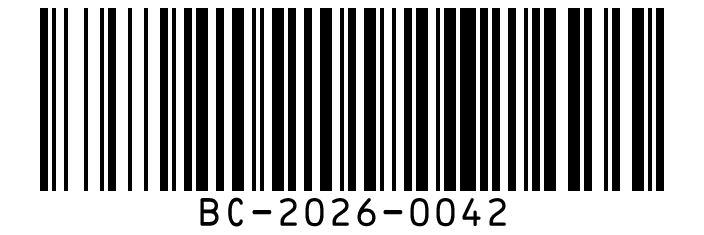
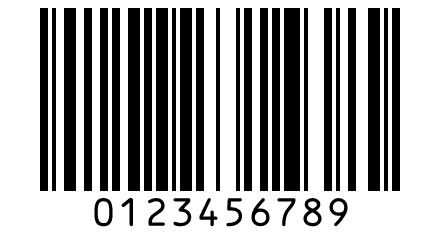
The examples below show how this generator encodes different data, measured with its own encoder.
| Data | Code sets used | Symbol characters | Width in modules |
|---|---|---|---|
| BC-2026-0042 | B: BC-2026- · C: 0042 | 13 | 156 |
| 0123456789 | C: 0123456789 | 7 | 90 |
| Order 12345678 | B: Order · C: 12345678 | 13 | 156 |
| Size: S/M/L | B: Size: S/M/L | 13 | 156 |
Why Numbers Make Shorter Barcodes
In code set C each symbol character carries two digits, so ten digits need only five data characters. That is why 0123456789 takes 90 modules while the 12-character BC-2026-0042 takes 156.
Forcing One Code Set
Some systems expect a particular code set. Choose A, B or C under Code set to draw the whole symbol in one set; the generator explains when a set cannot encode the data, such as an odd number of digits in code set C.
Code 128 vs Code 39
Code 128 encodes all of ASCII and packs digits in pairs, while standard Code 39 covers capital letters, digits and seven symbols in wider characters.
Code 128 vs Code 39 the full comparison: characters, width, check characters and when to use each.
Frequently Asked Questions
Is This Code 128 Generator Free?
Yes. There is no account, watermark or download limit, and the barcodes may be used commercially.
Does the Generator Add the Check Character?
Yes, always. Code 128 requires a check character, calculated with modulo 103, and it is not printed in the text under the bars.
Can Code 128 Encode Lowercase Letters?
Yes. Code set B includes lowercase letters, and the generator switches to it whenever the data needs it.
What Is the Difference Between Code 128 and GS1-128?
GS1-128 is Code 128 with an FNC1 character at the start and data written with GS1 Application Identifiers. Use GS1-128 for GTINs, batch numbers and dates that trading partners read.
Can I Use a Code 128 Font Instead?
A font cannot pick code sets or add the check character by itself, so it needs extra software to work. An image or SVG from this generator is a complete, valid symbol.
How Long Can a Code 128 Barcode Be?
The generator encodes as much data as you type, but long symbols get wide. Keep the data short, or use a 2D code such as Data Matrix for long text.
Related Barcode Tools
- Code 39 barcode generator
For systems that require Code 39.
- ITF-14 barcode generator
For GTINs on cartons.
- Scan a Code 128 barcode
Check a printed label with your camera.
- Barcode font encoder
Text for the free Code 128, Code 39 and EAN-13 barcode fonts.