SMS QR Code Generator
Make a free SMS QR code: scanning it opens a new text message to your number, with a message already written if you add one. The person still presses Send. The generator writes the standard sms link with the country code and shows it in full. Download SVG, PNG, PDF or EPS.
13.5 × 13.5 mm at 300 DPI
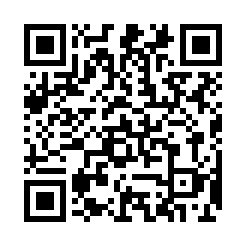
Scaled to fit. Actual size shows the print size on screen.
Print simulationNew
Shows how a worn print looks and tests it with the decoder.
Blue bars: the start, center and end guard patterns. Downloads stay in your chosen colors.
- Type
- QR Code · 2D
- Print size
- 13.5 × 13.5 mm
- Raster
- 164 × 164 px
- Symbol
- version 4, 33 × 33
- GS1 prefix
- Read back
Download
Vector drawing, 13.5 × 13.5 mm. Design and label programs place it at its print size.
More export optionsNewTest sheet · size set · embed code
Print test sheet (PDF)
The code at 80%, 100% and 150% with 100 mm and 4 in rulers. Print it at actual size and scan each copy before printing many.
Size set (ZIP)
Magnification
DPI
Embed code
How to Create an SMS QR Code
Enter the number and an optional message, check the encoded link, and download the code.
- Type the number with + and the country code.
- Add the message the text should start with, such as a keyword.
- Check the encoded sms link, then download the code.
- Scan a test print and check the message opens correctly.
SMS QR Code Fields
An SMS QR code holds the phone number and, if you add one, the start of the message.
| Field | Required | Notes |
|---|---|---|
| Phone number | Yes | Start with + and the country code. |
| Message | No | Optional: the text the message starts with. The person scanning still presses Send. |
| Encoded form | sms:+<country code><number>?body=<message> |
|---|---|
| Example | sms:+12125550100?body=Please%20call%20me%20back. |
| Special characters | Percent-encoding in the message |
| When scanned | Readers open a new text message to the number, ready to be sent |
| Checked before drawing | The number must start with + and the country code. The message is optional and is percent-encoded after body=. |
| Read back by Barcode.codes | The Barcode.codes scanner names the number and the message, and reads the SMSTO:number:message form seen in practice too. |
| Standard | The sms URI, RFC 5724 (July 2010); ZXing notes SMSTO: links without an official specification. |
| Size of the example | The generator's example is 48 characters long: a version 4 QR code of 33 × 33 modules at error correction M. |
| Error correction | Choose L (about 7% of the code can be restored), M (about 15%, the default), Q (about 25%) or H (about 30%), as DENSO WAVE lists them; a higher level makes a larger code. |
Sources, checked 2026-10-04: RFC 5724: URI Scheme for GSM Short Message Service; ZXing: Barcode Contents.
How an SMS QR Code Works
The code holds an sms link, defined in RFC 5724, with the message in its body parameter.
Other SMS Formats
Some codes use SMSTO:number:message, which ZXing has seen in use without an official specification. The generator writes the RFC 5724 form, and the Barcode.codes scanner reads both.
Where SMS QR Codes Help
A text message code works well for sign-ups, keywords and replies that should arrive by text.
Examples
Keywords: a code that starts a message with a campaign keyword.
Appointments: a code that starts a booking request.
Feedback: a code at a counter for a quick text reply.
Common SMS QR Code Problems
Problems come from the number or from phones that cannot send texts.
What to Check
- Country code: include + and the country code so the message reaches you from abroad.
- Message length: keep the message short; long text makes a dense code.
- Devices: tablets without a phone plan may not be able to send texts.
Frequently Asked Questions
Does Scanning the Code Send a Text?
No. It opens a new message with the details filled in; the person presses Send.
Can the Message Be Changed Before Sending?
Yes. The message only fills in the text field; the person can edit it.
Which SMS Format Does the Generator Use?
The sms link of RFC 5724, such as sms:+12125550100?body=Hello.
Does It Work With Short Codes?
The generator asks for a full international number. Short codes are not covered.
Is the SMS QR Code Generator Free?
Yes, with no account, watermark or download limit.
Is My Number Sent Anywhere?
No. The code is built and drawn in your browser.
Related QR Code Generators
- QR code generator
Every QR content type on one page.
- Phone number QR code generator
Let people call you.
- WhatsApp QR code generator
Chat on WhatsApp instead.