QR Code to Barcode
Convert a QR code to a barcode for free. Choose, drop or paste a picture of the QR code: its content is read on your device and listed with every barcode type that can hold it, and the exact reason for those that cannot. Pick one, then download it as SVG, PNG, PDF or EPS.
Code 128 · 98.0 × 19.9 mm
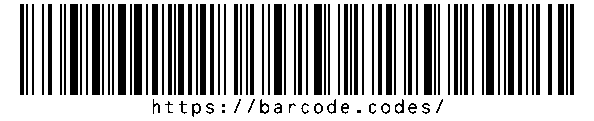
- Type
- Code 128 · 1D
- Print size
- 98.0 × 19.9 mm
- Raster
- 1188 × 241 px
- Content
- 22 characters
- Read back
- Runs when the content or type changes
Print size at the generator's default bar width: 98.0 × 19.9 mm.
Download
Vector drawing, 98.0 × 19.9 mm. Design and label programs place it at its print size.
Everything runs in your browser: the picture and the content stay on your device.
How to Convert a QR Code to a Barcode
Read the QR code from a picture, choose a barcode type that can hold its content, and download it.
- Choose, drop or paste a picture of the QR code; its content appears in the Content field.
- Check the list of types that can hold the content, and open the reasons for the others.
- Choose a type from the list or the menu; the barcode is drawn and read back with the scanner's decoder.
- Choose the format and DPI, then download SVG, PNG, WebP, JPEG, PDF or EPS, or open the generator to set the size and colors.
Which Barcodes Can Hold a QR Code's Content
It depends on the content: any text fits Code 128 and the 2D codes if it is short enough, while product barcodes hold digits of one exact length.
Any Text
- Code 128: ASCII text and Latin-1 letters; long text makes a wide barcode.
- Code 39 and Code 93 Full ASCII: all ASCII characters.
- Data Matrix, PDF417, Aztec and MaxiCode: any text up to each type's capacity.
Digits Only
- UPC-A, EAN-13 and EAN-8: a product number of exactly the right length, with a valid check digit.
- ITF-14 and Interleaved 2 of 5: digits only; ITF-14 needs 13 or 14.
Restricted Characters
- Code 39 and Code 93: capital letters, digits, space and - . $ / + %.
- Micro QR Code: short data only: up to 35 digits or 21 capital letters and digits.
Why Some Content Does Not Fit
A QR code holds far more, and more kinds of characters, than most barcodes, so the converter names the rule each type breaks.
Web Addresses
A web address has lowercase letters and symbols such as : and /. Code 128 and the 2D codes can hold it; Code 39, product barcodes and digit-only types cannot.
Long Text
Linear barcodes grow wider with every character, and 2D codes have a maximum. When the content is too long for a type, the converter says so and shows the types that still fit.
QR Code vs Barcode: Which to Use
Keep the QR code when the content is a web address for phones; convert it when a scanner, system or label format requires another type.
QR code vs barcode how the two differ in data, scanning and errors, and when to use each.
Is the QR Code Image Uploaded?
No: the picture is read in your browser, and the barcode is drawn there too.
What Stays on Your Device
The image, its content and the barcode never leave your device. Like every page on the site, this one records an anonymous page visit with Google Analytics, as the privacy policy explains.
Frequently Asked Questions
Can Any QR Code Be Turned Into a Barcode?
Only if a barcode type can hold its content. Short text and digits fit many types; a long web address fits Code 128 and the 2D codes; very long content fits only the larger 2D codes.
Will the New Barcode Open the Same Link?
It holds the same text, but whether a scan opens the link depends on the scanning app. Keep a QR code if people should open the link with a phone camera.
Is the Converter Free?
Yes. There is no account and no limit, and the barcodes may be used commercially.
Why Does It Say My Content Is Too Long?
Each barcode type has a maximum, and QR codes can hold far more. Choose a type from the list of those that fit, or shorten the content.
Can I Convert a Barcode Back to a QR Code?
Yes: read the barcode with the reader, copy its content, and make a QR code with the generator.
Which Pictures Can I Use?
Any image your browser can open, such as PNG, JPEG, WebP or a screenshot. A sharp, close picture of the whole QR code reads best.
Related Barcode Tools
- QR code reader
Read a QR code from a picture and see its content.
- Barcode generator
Make any of 23 barcode types from typed data.
- Code 128 barcode generator
The usual barcode for text.