How Do Barcodes Work? How a Barcode Is Read and Decoded
Barcodes work by writing data as a pattern of dark and light widths that a scanner measures with light and decodes back into the number or text. This guide explains how bars, spaces and modules store data, how laser and camera scanners read them, how the check digit catches errors and why some barcodes will not scan.
By the Barcode.codes editorial teamReviewed
How a Barcode Stores Data
A barcode turns each character into a fixed pattern of dark and light elements, so the order of their widths spells out the data.
Bars, Spaces and Modules
The narrowest bar or space is one module wide, and every other element is a whole number of modules. In a UPC or EAN barcode each digit takes seven modules: two bars and two spaces, each one to four modules wide.
Each digit has three patterns, called number sets A, B and C. A UPC-A uses set A on the left half and set C on the right, so a scanner can tell the halves apart and read the barcode in either direction.
Start, Stop and Guard Patterns
Fixed patterns at the edges and in the middle mark where the data begins, ends and splits; in UPC and EAN barcodes they are the guard bars. Blank quiet zones outside them keep other print from being read as part of the code.
How Is a Barcode Read?
A scanner lights the barcode, measures how much light each part reflects, and turns the pattern of dark and light widths back into characters.
- The scanner lights the barcode, with a laser beam or its own light, and captures the reflection.
- Dark bars reflect little light and light spaces reflect much more, so the scanner gets a profile of the widths along a line.
- The decoder matches the widths to the symbology's patterns, using the guard or start and stop patterns to find the code.
- It verifies the check digit or check character, and only then passes the data to the computer or the till.
Laser Scanners and Image-Based Scanners
A laser scanner sweeps a beam across the bars, which is enough for 1D barcodes but not for 2D ones. An image-based scanner, including a phone camera, takes a picture and decodes it, so it reads 1D and 2D barcodes alike. GS1 notes that only 2D imagers and camera-based systems can scan 2D barcodes.
Why the Check Digit Matters
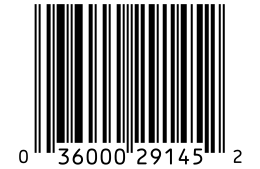
The last digit of a retail barcode is calculated from the others, and the reader checks it on every scan. A smudged bar that changes one digit makes the sum wrong, so the scanner rejects the read instead of entering a wrong number.
Try it: check digit calculator
11 digits without the check digit.
Check digit
2
036000291452
Show the calculation
| # | Character | Value | Weight | Product |
|---|---|---|---|---|
| 1 | 0 | 0 | ×3 | 0 |
| 2 | 3 | 3 | ×1 | 3 |
| 3 | 6 | 6 | ×3 | 18 |
| 4 | 0 | 0 | ×1 | 0 |
| 5 | 0 | 0 | ×3 | 0 |
| 6 | 0 | 0 | ×1 | 0 |
| 7 | 2 | 2 | ×3 | 6 |
| 8 | 9 | 9 | ×1 | 9 |
| 9 | 1 | 1 | ×3 | 3 |
| 10 | 4 | 4 | ×1 | 4 |
| 11 | 5 | 5 | ×3 | 15 |
| Sum | 58 | |||
Nearest multiple of ten at or above 58 is 60: 60 − 58 = 2
How to read a barcode reading the digits and the bars by eye, without a scanner.
How 2D Barcodes Work
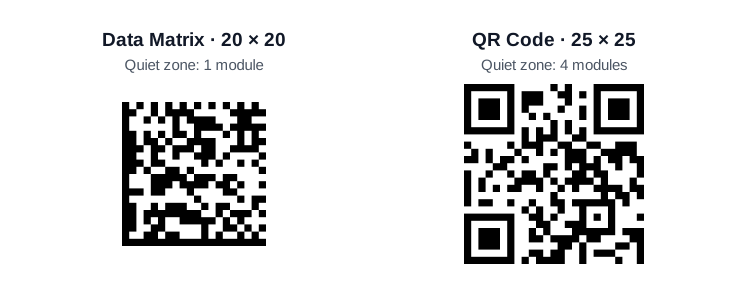
A 2D barcode stores bits in a grid of square modules, dark for 1 and light for 0, with fixed finder patterns that show the scanner where the grid is.
Finder Patterns and Error Correction
The finder patterns let the scanner locate the code, measure its grid and turn it the right way, even upside down. Reed-Solomon error correction adds extra codewords, so a 2D barcode can still be read when part of it is damaged or dirty.
What is a QR code? how a QR code stores data, what it can hold and how to scan one.
Why a Barcode Will Not Scan
Most failed scans come from too little contrast, a missing quiet zone, a barcode printed too small, or damage across the bars.
- Low contrast: dark bars on a dark or shiny background, or light colors that reflect like the spaces.
- No quiet zone: text or a box edge printed too close to the bars.
- Too small or too short: bars thinner than the scanner can resolve, or a retail barcode cut below GS1's minimum height.
- Damage and glare: scratches, folds or a glossy film that reflects the light back.
Barcode scanner reads a barcode with your camera and shows the type and the data.
Frequently Asked Questions
Can a Barcode Be Read Upside Down?
Yes. UPC and EAN barcodes can be read in any direction, because their two halves use different digit patterns. QR codes can be read at any rotation, and even mirrored.
Can Humans Read Barcodes?
Not the bars in practice, which is why retail barcodes print the same number in digits underneath. Those digits are what you type when a barcode will not scan.
How Do Barcode Scanners Work With Phones?
A phone scans with its camera: an app takes frames from the camera and decodes the barcode in the image. The iPhone Camera app opens QR codes on its own, and the Barcode.codes scanner reads 1D and 2D barcodes in the browser.
What Happens When a Barcode Is Scanned at a Store?
The scanner decodes the number, verifies its check digit and passes it to the till. The till looks the number up in the store's own system and shows the product name and price.
Sources
The facts in this guide come from these sources, checked on October 8, 2026.
GS1 General Specifications, Release 26.0, ratified January 2026 defines the GS1 identification keys, barcodes and Application Identifiers; the text names the sections used.
Apple iPhone User Guide: Scan a QR code describes reading QR codes with the iPhone Camera app.
BWIPP symbology references (Code 128, Code 39, Data Matrix, PDF417, Aztec Code, MaxiCode) documents the character sets, sizes and standards of the encoder the generator uses.
Related Barcode Guides
- What is a barcode?
What a barcode is, what it holds and where it is used.
- Types of barcodes
Every 1D and 2D barcode type, what it holds and where it is used.
- What is a UPC code?
The 12 digits, the check digit and how to get one.
- Data Matrix vs QR code
Size, capacity and error correction of the two 2D codes.
- What is a GS1 barcode?
GS1 barcode types, keys and data.