Spotify QR Code Generator for Songs, Playlists and Profiles
Make a Spotify QR code for a song, album, artist, playlist, podcast or profile: copy its link in Spotify with Share, then Copy link, and paste it here. The code holds that link, so a QR code reader opens it. Barcode.codes is not affiliated with Spotify and draws the code in your browser.
13.5 × 13.5 mm at 300 DPI
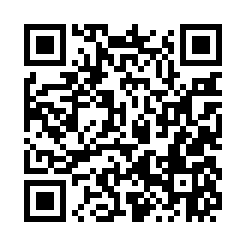
Scaled to fit. Actual size shows the print size on screen.
Print simulationNew
Shows how a worn print looks and tests it with the decoder.
Blue bars: the start, center and end guard patterns. Downloads stay in your chosen colors.
- Type
- QR Code · 2D
- Print size
- 13.5 × 13.5 mm
- Raster
- 164 × 164 px
- Symbol
- version 4, 33 × 33
- GS1 prefix
- Read back
Download
Vector drawing, 13.5 × 13.5 mm. Design and label programs place it at its print size.
More export optionsNewTest sheet · size set · embed code
Print test sheet (PDF)
The code at 80%, 100% and 150% with 100 mm and 4 in rulers. Print it at actual size and scan each copy before printing many.
Size set (ZIP)
Magnification
DPI
Embed code
How to Make a Spotify QR Code
Copy the link in Spotify, paste it here, check it and download the code.
- In Spotify, go to what you want to share and open its menu; on a computer, right-click it.
- Choose Share, then Copy link.
- Paste the link above and check it in the encoded content below the form.
- Download the code and scan a test print: it should open what you copied.
Spotify QR Code Fields
A Spotify QR code holds one field: the link you copied from Spotify, exactly as copied.
| Field | Required | Notes |
|---|---|---|
| Spotify link | Yes | In Spotify, open what you want to share, choose Share, then Copy link, and paste it here. |
| Encoded form | The link from Share, Copy link in Spotify, exactly as copied |
|---|---|
| Example | https://open.spotify.com/playlist/YOUR-PLAYLIST-ID |
| Special characters | None: the link is written as it is |
| When scanned | It is a web link: readers open it, and the phone shows the song, album, artist, playlist, podcast or profile in Spotify or the browser |
| Checked before drawing | The link must be on spotify.com; https:// is added when it is left out. Nothing is looked up, so check the link opens what you meant before printing. |
| Read back by Barcode.codes | The Barcode.codes scanner shows the link in full with an Open button naming its host. |
| Standard | Spotify Support: Share, then Copy link, works for songs, albums, artists, playlists, podcasts and profiles. Spotify also has its own Spotify Code, shown with Show Spotify Code and in high resolution at spotifycodes.com. |
| Size of the example | The generator's example is 50 characters long: a version 4 QR code of 33 × 33 modules at error correction M. |
| Error correction | Choose L (about 7% of the code can be restored), M (about 15%, the default), Q (about 25%) or H (about 30%), as DENSO WAVE lists them; a higher level makes a larger code. |
Sources, checked 2026-10-09: Spotify Support: Share from Spotify; ZXing: Barcode Contents.
Spotify Codes and QR Codes
Spotify has its own Spotify Code, shown with Show Spotify Code in the share menu; a QR code from this page holds the Spotify link instead.
Spotify's Own Code
Spotify says a friend can scan a Spotify Code with their phone camera, and that you can scan one in the app from Search with the camera button. For a high-resolution Spotify Code, Spotify points to spotifycodes.com.
When a QR Code Helps
A QR code of the link can be read by QR code readers in general, and here you can download it as SVG or PNG with your own size and colors. It carries no Spotify branding, so add a line saying what it plays.
A Spotify QR Code for a Playlist
Copy the playlist's link with Share, then Copy link, and paste it here: the code opens that playlist.
The same works for songs, albums, artists, podcasts and your profile, which Spotify's share menu covers too. The code holds the link, not the songs, so people see the playlist as it is when they scan it.
A Spotify QR Code Generator That Checks the Link
This generator accepts only links on spotify.com, so a link copied from somewhere else is refused before it is drawn.
It does not look the link up, so it cannot tell whether a song or playlist exists. Scan a test print and check that it opens what you meant before you print many.
Frequently Asked Questions
Is the Spotify QR Code Generator Free?
Yes. There is no account, watermark or download limit, and the code is drawn in your browser.
Is a Spotify Code the Same as a QR Code?
No. A Spotify Code is Spotify's own code, shown in the app or made at spotifycodes.com; this page makes a standard QR code that holds the Spotify link.
Where Do I Find the Link on a Computer?
Right-click what you want to share, or select the menu next to it, then choose Share and Copy Link.
Can I Make a QR Code for a Podcast?
Yes. Spotify's share menu has Copy link for podcasts too; paste that link here.
Will the QR Code Expire?
No. It holds the Spotify link itself, with no redirect through Barcode.codes, so it works as long as the link does.
Is Barcode.codes Part of Spotify?
No. Barcode.codes is not affiliated with Spotify. The code is a plain QR code of your link, with no Spotify branding.
Related QR Code Generators
- QR code generator
Every QR content type on one page.
- YouTube QR code generator
A QR code for a YouTube channel.
- URL QR code generator
A QR code for any web link.
- Custom QR code generator
Colors, shapes and a logo, checked to scan.