Code 39 Barcode Generator
Make a Code 39 barcode, also called Code 3 of 9, online for free. Type capital letters, digits and a few symbols, or switch to Code 39 Full ASCII for lowercase text, add the optional modulo 43 check character, and download SVG, PNG, PDF or EPS at your printer's DPI.
48.5 × 19.4 mm at 300 DPI
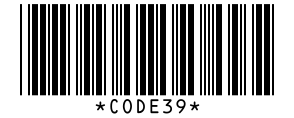
Scaled to fit. Actual size shows the print size on screen.
Print simulationNew
Shows how a worn print looks and tests it with the decoder.
Blue bars: the start, center and end guard patterns. Downloads stay in your chosen colors.
- Type
- Code 39 · 1D
- Print size
- 48.5 × 19.4 mm
- Raster
- 588 × 236 px
- Modules
- GS1 prefix
- Read back
Download
Vector drawing, 48.5 × 19.4 mm. Design and label programs place it at its print size.
More export optionsNewTest sheet · size set · embed code
Print test sheet (PDF)
The code at 80%, 100% and 150% with 100 mm and 4 in rulers. Print it at actual size and scan each copy before printing many.
Size set (ZIP)
Magnification
DPI
Embed code
How to Create a Code 39 Barcode
Type the data, choose standard or Full ASCII, decide on the check character, and download.
- Type your data in capital letters, digits and the symbols - . $ / + % or space.
- For lowercase letters or other symbols, choose Code 39 Full ASCII in the menu.
- Tick Add a check character if your scanner or system expects the modulo 43 check character.
- Download SVG, PNG, PDF or EPS and test-scan a print.
Code 39 and Code 39 Full ASCII
Standard Code 39 encodes 43 characters; Code 39 Full ASCII builds all 128 ASCII characters from pairs of them.
Standard Code 39
- Characters: 0 to 9, A to Z, the space and six symbols: -, ., $, /, + and %.
- Start and stop: the * character, shown in the text under the bars.
- Lowercase: not available, and the generator names any character it cannot encode.
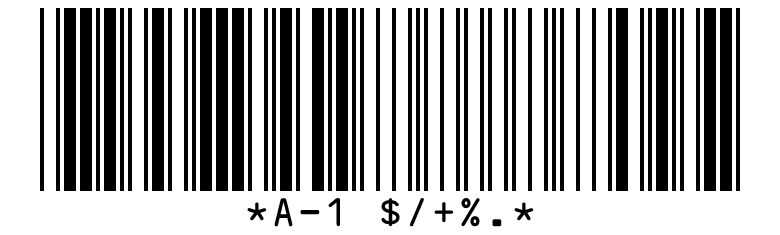
Code 39 Full ASCII
- Characters: all 128 ASCII characters, lowercase letters included.
- How: each extra character is written as a pair of standard characters.
- Reading: readers need Full ASCII decoding to rebuild the characters; the Barcode.codes scanner reads it.

Code 39 Specifications
These are the rules of Code 39 and Code 39 Full ASCII as described in the encoder's references, which cite ISO/IEC 16388.
| Property | Code 39 | Code 39 Full ASCII |
|---|---|---|
| Digits | Variable length | Variable length; a character outside standard Code 39 takes two symbol characters |
| Characters | Digits 0 to 9, capital letters A to Z, space and - . $ / + %; * is the start and stop character | All 128 ASCII characters, lowercase letters and control characters included |
| Check digit | Optional modulo 43 check character | Optional modulo 43 check character, as in standard Code 39 |
| Symbology type | Discrete (a narrow gap separates the characters), variable length and self-checking | Discrete, variable length and self-checking, like standard Code 39 |
| Full ASCII | Code 39 Extended, also called Code 39 Full ASCII, encodes all 128 ASCII characters with shift combinations of standard characters | Not applicable |
| Width in this generator | 16 modules per character at a 3:1 wide-to-narrow ratio, the gap included | 16 modules per standard character and 32 for a character written as a pair, such as a lowercase letter |
| Standards | ISO/IEC 16388, ANSI/AIM BC1 (USS Code 39) and BS EN 800 | ISO/IEC 16388, ANSI/AIM BC1 (USS Code 39) and BS EN 800 |
| How extra characters are written | Not applicable | As a shift combination of two standard Code 39 characters |
| Where the numbers come from | Your own data | Your own data |
| Example | CODE39 | Code 39 Full ASCII |
BWIPP Code 39 and Code 39 Extended references (character set, start and stop, symbology type, modulo 43 check character, standards); width measured in this generator (test/page-examples.test.ts). BWIPP Code 39 Extended reference (full ASCII through shift combinations, options, standards); widths measured in this generator (test/page-examples.test.ts).
Sources, checked 2026-10-04: Code 39 reference (BWIPP); Code 39 Extended reference (BWIPP).
The Code 39 Check Character
Code 39 works without a check character, but systems that need extra protection add one calculated with modulo 43.
A Worked Example
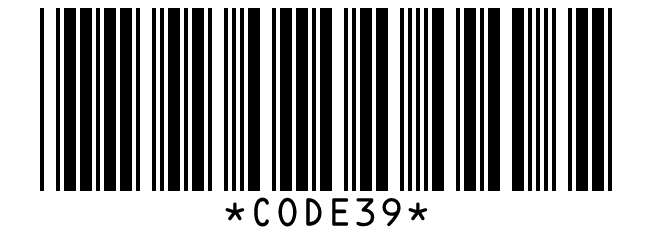
Each character has a value: 0 to 9 for digits, 10 to 35 for A to Z, and 36 to 42 for the seven symbols. For CODE39 the values add up to 12 + 24 + 13 + 14 + 3 + 9 = 75, and 75 modulo 43 is 32, the value of W, so the symbol encodes CODE39W.
When to Add It
Add the check character only if the receiving system expects it, because a scanner that does not strip it passes W on as part of the data. The text under the bars shows the data without it.
Why It Is Called Code 3 of 9
Each Code 39 character is made of nine bars and spaces, and three of the nine are wide: that is where the name 3 of 9 comes from.
Wide and Narrow Elements
Five bars and four spaces form each character, with a narrow space between characters. In this generator a character takes 16 modules, so Code 39 is wider than Code 128 for the same data.
Frequently Asked Questions
Is Code 39 the Same as Code 3 of 9?
Yes. Both names describe the same symbology; 3 of 9 refers to the three wide elements among the nine in each character.
Can Code 39 Encode Lowercase Letters?
Standard Code 39 cannot. Choose Code 39 Full ASCII, and set your scanner to Full ASCII so it rebuilds the lowercase letters.
Why Are There Asterisks in the Text?
The * is the start and stop character of Code 39. It is part of every symbol and is printed in the text, but scanners do not pass it on.
Should I Add the Check Character?
Only if the system that reads the barcode expects it. Otherwise the extra character ends up in the scanned data.
Is This Code 39 Generator Free?
Yes, with no account, watermark or download limit, for personal and commercial use.
Why Is My Code 39 Barcode Wider Than Code 128?
Code 39 uses 16 modules per character in this generator, against 11 for Code 128. Shorten the data, lower the X-dimension within what your printer handles, or use Code 128.
Related Barcode Tools
- Code 128 barcode generator
A shorter barcode for the same text.
- Code 93 barcode generator
Code 39's character set in less space.
- Read a Code 39 barcode from a photo
Check a barcode you already have.
- Barcode font encoder
Text for the free Code 128, Code 39 and EAN-13 barcode fonts.