GS1 DataMatrix Generator
Make a GS1 DataMatrix code online for free. Enter Application Identifiers such as (01) for the GTIN, (17) for the expiry date, (10) for the batch and (21) for the serial number, and GS1's Barcode Syntax Engine checks each one. See the encoded message and scanner output, then download SVG, PNG, PDF or EPS.
9.9 × 9.9 mm at 300 DPI
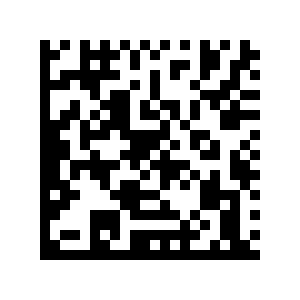
Scaled to fit. Actual size shows the print size on screen.
Print simulationNew
Shows how a worn print looks and tests it with the decoder.
Blue bars: the start, center and end guard patterns. Downloads stay in your chosen colors.
- Type
- GS1 DataMatrix · 2D
- Print size
- 9.9 × 9.9 mm
- Raster
- 120 × 120 px
- Modules
- GS1 prefix
- Read back
Valid GS1 data: 4 element strings, checked with GS1's Barcode Syntax Engine 1.4.1.
Message with FNC1
FNC101095060001343521727123110LOT42FNC121SN1001
What a scanner sends
]d201095060001343521727123110LOT42{GS}21SN1001
GS1 Digital Link URI
https://id.gs1.org/01/09506000134352/10/LOT42/21/SN1001?17=271231
A valid structure is not GS1 certification: the GTIN or SSCC must come from your own GS1 Company Prefix, licensed by GS1.
The check runs on your device with the GS1 Barcode Syntax Engine 1.4.1, © GS1 AISBL, under the Apache License 2.0.
Download
Vector drawing, 9.9 × 9.9 mm. Design and label programs place it at its print size.
More export optionsNewTest sheet · size set · embed code
Print test sheet (PDF)
The code at 80%, 100% and 150% with 100 mm and 4 in rulers. Print it at actual size and scan each copy before printing many.
Size set (ZIP)
Magnification
DPI
Embed code
Type an AI number or pick one from the list.
How to Make a GS1 DataMatrix Code
Enter the AIs and values, let the check confirm them, and download the code.
- Start with a key, such as (01) and the 14-digit GTIN of the product.
- Add the batch, dates and serial number your product needs, using the date picker for dates.
- Read the check under the preview and fix the AI it names, if any.
- Set the module size for your printer and download SVG, PNG, WebP, JPEG, PDF or EPS.
GS1 DataMatrix Example
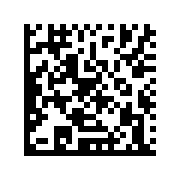
The sample code holds a GTIN, an expiry date, a batch and a serial number: (01)09506000134352(17)271231(10)LOT42(21)SN1001.
Reading the Example
- (01) 09506000134352: the GTIN of the product.
- (17) 271231: the expiration date, YYMMDD: December 31, 2027.
- (10) LOT42: the batch or lot number.
- (21) SN1001: the serial number of this one item.
What the Scanner Sends
A scanner reports GS1 DataMatrix with the symbology identifier ]d2, then the data, with each FNC1 separator sent as the group separator, ASCII 29. The panel under the preview shows this output for your data.
Application Identifiers for GS1 DataMatrix
These AIs identify a product and its batch, dates and serial number; the builder accepts all 541 AIs in GS1's list.
Format: N is a digit; X, Y and Z are characters from GS1's character sets 82, 39 and 64; ".." means up to that many; brackets mark an optional part.
| AI | Data title | Description | Format | FNC1 after it |
|---|---|---|---|---|
| (01) | GTIN | Global Trade Item Number (GTIN) | N14 | No |
| (10) | BATCH/LOT | Batch or lot number | X..20 | Yes, unless last |
| (11) | PROD DATE | Production date (YYMMDD) | N6 | No |
| (13) | PACK DATE | Packaging date (YYMMDD) | N6 | No |
| (15) | BEST BEFORE or BEST BY | Best before date (YYMMDD) | N6 | No |
| (16) | SELL BY | Sell by date (YYMMDD) | N6 | No |
| (17) | USE BY or EXPIRY | Expiration date (YYMMDD) | N6 | No |
| (21) | SERIAL | Serial number | X..20 | Yes, unless last |
| (30) | VAR. COUNT | Variable count of items (variable measure trade item) | N..8 | Yes, unless last |
| (240) | ADDITIONAL ID | Additional product identification assigned by the manufacturer | X..30 | Yes, unless last |
| (7003) | EXPIRY TIME | Expiration date and time (YYMMDDhhmm) | N10 | Yes, unless last |
| (8008) | PROD TIME | Date and time of production (YYMMDDhh[mm[ss]]) | N8[+N..4] | Yes, unless last |
Sources: GS1 Barcode Syntax Dictionary, release 2026-01-27, and the GS1 Application Identifiers vocabulary, version 1.2.
GS1 DataMatrix vs Data Matrix
GS1 DataMatrix is Data Matrix ECC 200 that starts with FNC1, so its data must be GS1 element strings.
| Property | Data Matrix | GS1 DataMatrix |
|---|---|---|
| First character | Data | FNC1 |
| Data | Any text | GS1 element strings (AI and value) |
| Scanner prefix | Not GS1 data | ]d2 |
| Checks on this site | Characters and capacity | AIs, lengths, check digits, dates and AI pairs |
Which One to Use
Use GS1 DataMatrix when trading partners read the code as GS1 data, such as a GTIN with a batch and expiry date. Use plain Data Matrix for your own parts and assets.


Printing GS1 DataMatrix Codes
Keep at least one module of blank space around the code and print each module as a whole number of printer dots.
Module Size
The X-dimension is the width of one square module. The generator turns it into whole printer dots at the DPI you choose and shows the printed size; ask your trading partners which size range their scanners need.
Test Before Printing Many
Scan a test print with the scanner on this site: it reads GS1 DataMatrix and lists every AI and value. A matching result shows the data is right, not that the print quality meets a grade.
Frequently Asked Questions
What Is GS1 DataMatrix?
GS1 DataMatrix is Data Matrix ECC 200 that starts with FNC1 and carries GS1 element strings. GS1's General Specifications state that ECC 200 is the only version of Data Matrix that supports GS1 data structures.
Why Is My Serial Number Rejected?
AI (21) takes up to 20 characters from GS1's character set 82 and needs (01), (03) or (8006) in the same code. The check names the rule that fails and marks the characters it rejects.
Does the Expiry Date Need a Day?
AI (17) is written YYMMDD. GS1 allows 00 as the day when only the year and month are known, so 271200 means December 2027.
Is a Valid Code the Same as a Certified One?
No. The check confirms the structure of the data, not that the GTIN belongs to you or that a printed code meets a quality grade. GTINs come from your GS1 Member Organization, and print quality is graded with a barcode verifier.
Can I Make Many GS1 DataMatrix Codes at Once?
No: the builder makes one code at a time, and the bulk barcode generator does not draw GS1 DataMatrix. Changing the serial number and downloading again takes a few seconds per code.
Is This GS1 DataMatrix Generator Free?
Yes. There is no account, watermark or download limit, and the data never leaves your browser.
Related GS1 Tools
- GS1-128 barcode generator
GTIN, batch, dates and more in GS1-128.
- Data Matrix generator
Plain Data Matrix for any text.
- Barcode scanner
Scan a test print with your camera.