GS1 Digital Link Generator
Make a GS1 Digital Link QR code online for free. Enter your GTIN and, if you track them, a batch, serial number or expiry date, choose GS1's resolver or your own domain, and GS1's Barcode Syntax Engine builds and checks the URI. Download it as a QR Code or Data Matrix in SVG, PNG, PDF or EPS.
13.5 × 13.5 mm at 300 DPI
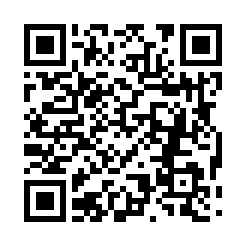
Scaled to fit. Actual size shows the print size on screen.
Print simulationNew
Shows how a worn print looks and tests it with the decoder.
Blue bars: the start, center and end guard patterns. Downloads stay in your chosen colors.
- Type
- GS1 Digital Link QR · 2D
- Print size
- 13.5 × 13.5 mm
- Raster
- 164 × 164 px
- Modules
- GS1 prefix
- Read back
Valid GS1 data: 3 element strings, checked with GS1's Barcode Syntax Engine 1.4.1.
GS1 Digital Link URI
https://id.gs1.org/01/09506000134352/10/LOT42?17=271231
Canonical form on id.gs1.org
https://id.gs1.org/01/09506000134352/10/LOT42?17=271231
Element strings
(01)09506000134352(10)LOT42(17)271231
Message with FNC1
FNC1010950600013435210LOT42FNC117271231
What a scanner sends
]d2010950600013435210LOT42{GS}17271231
GS1 Digital Link URI
https://id.gs1.org/01/09506000134352/10/LOT42?17=271231
A valid structure is not GS1 certification: the GTIN or SSCC must come from your own GS1 Company Prefix, licensed by GS1.
The check runs on your device with the GS1 Barcode Syntax Engine 1.4.1, © GS1 AISBL, under the Apache License 2.0.
Download
Vector drawing, 13.5 × 13.5 mm. Design and label programs place it at its print size.
More export optionsNewTest sheet · size set · embed code
Print test sheet (PDF)
The code at 80%, 100% and 150% with 100 mm and 4 in rulers. Print it at actual size and scan each copy before printing many.
Size set (ZIP)
Magnification
DPI
Embed code
Type an AI number or pick one from the list.
How to Make a GS1 Digital Link QR Code
Enter the web address and your GS1 data, check the URI the engine builds, and download the code.
- Keep https://id.gs1.org, GS1's resolver, or type your own domain and path.
- Enter the GTIN in AI (01), then add a batch (10), serial number (21) or expiry date (17) if you need them.
- Read the URI and the check under the preview, which names the AI and the rule when something is wrong.
- Choose QR Code or Data Matrix, set the size, and download SVG, PNG, WebP, JPEG, PDF or EPS.
GS1 Digital Link URI Syntax
A GS1 Digital Link URI is a web address: a domain, then the identification key and its qualifiers as path segments, then other data as query parameters.
Primary Key
The path starts with the AI of a GS1 identification key and its value, such as /01/ and a GTIN. GS1's URI syntax standard, release 1.7.0, lists the keys that can come first, including the GTIN (01), the SSCC (00) and the GLN (414). A GTIN-8, GTIN-12 or GTIN-13 is written with leading zeros to 14 digits.

Key Qualifiers
After a GTIN may come the consumer product variant (22), the batch or lot (10) and the serial number (21), in that order. The generator puts them in that order for you, and a pasted URI with another order is reported as not valid.

Data Attributes
Other AIs, such as the expiry date (17) or a net weight (3103), follow a question mark as key=value pairs, for example ?17=271231. Characters such as / and & in a value are percent-encoded, so a batch ABC/1 is written ABC%2F1.
Application Identifiers in a GS1 Digital Link
These AIs are the most common in a GS1 Digital Link: keys and qualifiers go in the path, the others in the query string; the builder accepts every AI in GS1's list.
Format: N is a digit; X, Y and Z are characters from GS1's character sets 82, 39 and 64; ".." means up to that many; brackets mark an optional part.
| AI | Data title | Description | Format | FNC1 after it |
|---|---|---|---|---|
| (01) | GTIN | Global Trade Item Number (GTIN) | N14 | No |
| (22) | CPV | Consumer product variant | X..20 | Yes, unless last |
| (10) | BATCH/LOT | Batch or lot number | X..20 | Yes, unless last |
| (21) | SERIAL | Serial number | X..20 | Yes, unless last |
| (17) | USE BY or EXPIRY | Expiration date (YYMMDD) | N6 | No |
| (15) | BEST BEFORE or BEST BY | Best before date (YYMMDD) | N6 | No |
| (3103) | NET WEIGHT (kg) | Net weight, kilograms (variable measure trade item) | N6 | No |
| (00) | SSCC | Serial Shipping Container Code (SSCC) | N18 | No |
| (414) | LOC No. | Identification of a physical location - Global Location Number (GLN) | N13 | No |
| (254) | GLN EXTENSION COMPONENT | Global Location Number (GLN) extension component | X..20 | Yes, unless last |
| (8004) | GIAI | Global Individual Asset Identifier (GIAI) | X..30 | Yes, unless last |
Sources: GS1 Barcode Syntax Dictionary, release 2026-01-27, and the GS1 Application Identifiers vocabulary, version 1.2.
GS1 Digital Link Example
The same GS1 data written as element strings and as a GS1 Digital Link URI; each URI below was built by GS1's Barcode Syntax Engine.
| GS1 data | Element strings | GS1 Digital Link URI |
|---|---|---|
| A GTIN | (01)09506000134352 | https://id.gs1.org/01/09506000134352 |
| GTIN, batch and expiry date | (01)09506000134352(10)LOT42(17)271231 | https://id.gs1.org/01/09506000134352/10/LOT42?17=271231 |
| GTIN and serial number on your own domain | (01)09506000134352(21)12345 | https://brand.example/p/01/09506000134352/21/12345 |
| An SSCC | (00)106141411234567897 | https://id.gs1.org/00/106141411234567897 |
Your Own Domain or GS1's Resolver
Any web address can carry the GS1 path: GS1's resolver at id.gs1.org, or your own domain, whose web server then answers those paths.
The Canonical Form
GS1's URI syntax standard defines one canonical form for every GS1 Digital Link URI: https, the domain id.gs1.org and the query parameters in lexical order. The generator shows that form next to the URI on your domain, so systems that compare identifiers can use it.
Your Own Domain
With your own domain, the QR code opens your website, so your server must answer paths such as /01/09506000134352. Barcode.codes does not host or redirect links: the address goes into the code exactly as shown, and nothing is stored.
QR Code or Data Matrix for GS1 Digital Link
GS1 lists both for retail: a QR Code or a Data Matrix that holds the GS1 Digital Link URI, printed next to the UPC or EAN while stores move to 2D (General Specifications 26.0, section 4.15.4).
QR Code for Phones
Phone cameras read QR codes: on an iPhone, the Camera app opens them without another app. A QR Code with a GS1 Digital Link URI is a link for shoppers and the product number for scanners that read 2D barcodes.
Data Matrix and GS1 DataMatrix
The Data Matrix option here holds the same URI. GS1 DataMatrix is a different code that holds element strings without a web address; make it with the GS1 DataMatrix generator.

Frequently Asked Questions
What Is GS1 Digital Link?
GS1 Digital Link is GS1's way of writing identifiers such as the GTIN, with batch, serial number and other data, as a web address. One code can then serve a store's scanner and a shopper's phone. The syntax is set by the GS1 Digital Link Standard: URI Syntax.
Is a GS1 Digital Link QR Code a Regular QR Code?
Yes. It is a normal QR Code whose content follows the GS1 Digital Link URI syntax, so scanners that support it can take the GTIN out of it and phones open it as a link. The generator checks that syntax before it draws the code.
Do I Need a GTIN From GS1?
Yes, for products you sell. The GTIN must come from your company's GS1 Company Prefix or an individual GTIN licensed by GS1; this generator checks the structure and check digit, not the licence.
Can I Use My Own Domain?
Yes. GS1's URI syntax allows any domain and path before the GS1 part, such as https://brand.example/p/01/09506000134352. Your web server must then answer that address, or redirect it to the right page.
Why Is My GS1 Digital Link Not Valid?
The engine names the rule: common causes are a GTIN that is not 14 digits, a wrong check digit, qualifiers in the wrong order in a pasted URI, or a batch without a GTIN. Fix the AI it names and the URI is built again.
Does This Generator Track Scans or Expire?
No. The code holds your web address directly, with no redirect through Barcode.codes, so it never expires and nobody counts its scans here. Whatever your own website measures is up to your website.
Related GS1 Tools
- GS1 DataMatrix generator
GS1 data in a small 2D code.
- GS1-128 barcode generator
GTIN, batch, dates and more in GS1-128.
- Barcode reader
Read a GS1 barcode from an image and see each AI.