Garment Barcode Generator for Clothing Labels
Make garment barcode labels for clothing in your browser: paste each style, color and size with its UPC, EAN or SKU, or open a CSV or Excel file, then print the labels on Avery or custom sheets as a PDF, with the style above the barcode and the size below it, as on a GS1 clothing label.
The first barcode appears here.
Print simulation
Shows how a worn print of the first barcode looks and tests it with the decoder.
- Labels
- 0
- Sheets
- 0
- Per sheet
- 24 (3 × 8)
- Label size
- 63.5 × 30.0 mm
- Barcode size
- —
- Cannot be drawn
- 0
- Type
- UPC-A · 1D
- Print size
- —
- Rows
- 0
- Ready
- 0
- Cannot be drawn
- 0
- Empty
- 0
Download
Paper
Output DPI
Thermal / offset
Before you print
A PDF test sheet with the first barcode at 80%, 100% and 150% and rulers. Print it at actual size and scan each copy.
Up to 5,000 labels in one PDF (about 209 sheets of 24).
Everything runs in your browser; nothing you paste or open is uploaded.
How to Make Garment Barcode Labels
Give each size and color of a style its own row, choose the barcode type and the label sheet, and print a test page before the rest.
- Paste one row per size and color into the box above: the barcode number, a tab, the style and color, a tab, and the size, such as Size M · $24.00 for a price. Rows copied from a spreadsheet keep their columns.
- Choose UPC-A or EAN-13 for GTINs, or Code 128 for your own SKUs.
- Keep the caption split, so the style prints above the barcode and the size below it, and set the copies to the number of garments of each row.
- Print the calibration page and one sheet, scan a few labels with a phone, then print the rest.
Barcode Types for Clothing
Clothing sold in stores carries a GTIN in a UPC-A or EAN-13 barcode; labels used only in your own shop can carry your SKU in a Code 128 or an internal UPC that starts with 4.
GTINs for Retail
- UPC-A: a GTIN-12, used on retail products mostly in North America.
- EAN-13: a GTIN-13, used on retail products mostly outside North America.
Codes for Your Own Shop
- Code 128: letters, digits and dashes, so a SKU such as TS-1042-NVY-M prints as written.
- Internal UPC-A starting with 4: GS1 keeps U.P.C. Prefix 4 for numbers a company assigns itself for internal use; they are not unique once the garment leaves the company.
A QR Code Next to the UPC
A hang tag can carry a 2D code, such as a QR code with a GS1 Digital Link, beside the UPC. When both are used at the point of sale, GS1 says the whole 2D code SHOULD sit within 50 mm (2 inches) of the center of the linear barcode, so the scanner knows they belong to the same item. A Digital Link needs a GTIN, not an internal number.
GS1 Digital Link generator a QR code with the GTIN on your own web address.
One Barcode for Each Size and Color
Every size and every color of a garment gets its own number, as the GS1 General Specifications say, so a scan tells the store exactly which variant was sold.
A T-shirt style in two colors and three sizes therefore needs six numbers, like the six rows the tool opens with. The style number can stay the same on all six labels; only the barcode and the size change.
Pre-Packs, Multi-Packs and Set-Packs
GS1 gives packs of clothing their own numbers. A multi-pack sold as one unit, such as a three-pack of T-shirts, gets a GTIN different from the single item, and a three-pack and a six-pack get different GTINs.
| Pack | Pack GTIN Marked | Items Sold Alone to Consumers | Item GTINs Marked |
|---|---|---|---|
| Pre-pack (ordered by the retailer, not sold as a pack) | Yes | Yes | Yes |
| Multi-pack (sold as one unit) | Yes | No | Optional |
| Set-pack (sold as a set or piece by piece) | Yes | Yes | Yes |
What Goes on a Clothing Barcode Label
GS1 divides a clothing label into zones: the style and vendor details at the top, the barcode in the middle, and the consumer details, size and price below it.
| Zone | Information | Status |
|---|---|---|
| 1 | Merchandise identification, usually the style number | Always required |
| 2 | Vendor details such as SKU, cut number, dye lot and color | Optional |
| 3 | The barcode with the GTIN | Always required |
| 4 | Consumer details such as fiber content and country of origin | Optional |
| 5 | Size or dimensions | Usually required |
| 6 | Space for the retail price | Usually required |
| 7 | Manufacturer's suggested retail price, on a perforated strip | Optional |
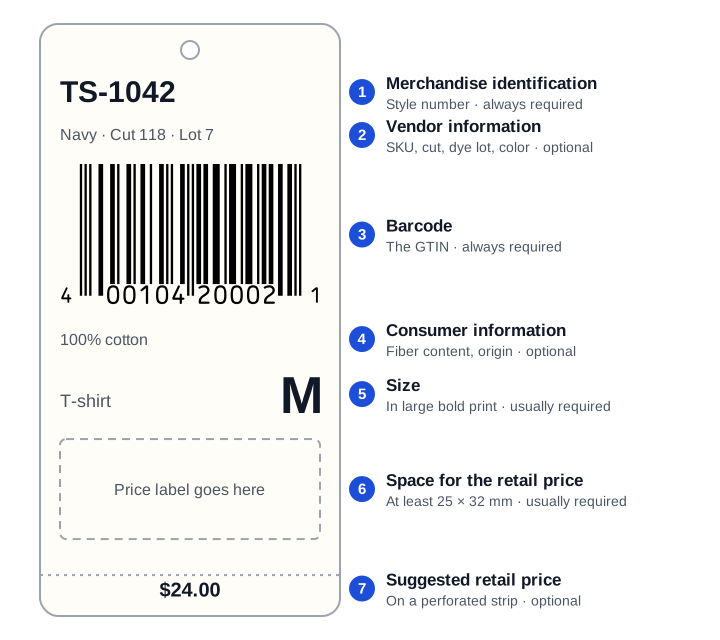
The tool's split caption follows this order on a sticker label: the first caption line prints above the barcode and the second below it.
Space for the Price
GS1 asks for room to print the price in characters of at least 25 by 32 mm (1 by 1.25 inches). On an adhesive label that space can be part of the label, or it can be an empty area of the package next to the size.
Types of Garment Barcode Labels
GS1 describes four ways a barcode goes on clothing: a hang tag, a sewn-on label, a sewn-in label and an adhesive label on a bag or box.
Hang Tags
GS1 says the barcode of a hang tag goes on its back, where the product codes are, while the front usually carries the brand's logo. A logo must not sit at the bottom of the back, where a price label may cover it, and must never cover the barcode.
Sewn-On and Sewn-In Labels
A sewn-on label, which GS1 calls a joker label, is sewn onto the garment, so one side carries the logo, the barcode and the product details. A sewn-in label, often used for towels, is partly covered by a hem, so GS1 asks for blank space on that end, clear of the barcode and the product information.
Adhesive Labels on Bags and Boxes
Clothing sold in bags or boxes can carry the barcode on an adhesive label, which is what this tool prints on sheets. For an adhesive label, GS1 says the space for the price can be part of the label, or an empty area of the package next to the size.
Printing Garment Barcode Labels
Print the barcode at a size GS1 allows for point-of-sale scanning, with its quiet zones free, in dark ink on a light label, and test-scan a sheet before printing the rest.
- Size: a UPC-A at the GS1 nominal size is 37.29 mm wide with bars 22.85 mm tall; GS1 allows 80% to 200% of it at the point of sale.
- Quiet zones: the light margins left and right of the bars are part of the barcode; the tool never shrinks a barcode into a label that is too small and says what to change.
- Number under the bars: keep the digits, so a cashier can type a damaged barcode.
- Sheet: the tool opens on Avery 5163 labels, 2 by 4 inches, which hold a nominal UPC-A with a caption line above and below it.
Barcode label generator every Avery sheet of the tool, custom grids and the calibration page.
Scanning Clothing Barcodes
A phone camera reads the UPC, EAN or Code 128 on a clothing tag in the barcode scanner, which shows the number the barcode holds.
The number alone does not give the price or the product: those live in the store's own system. For a UPC or EAN, the barcode lookup shows the GS1 prefix range and links to registries that may know the product.
Barcode scanner reads a tag with a phone or laptop camera, or with a USB scanner.
Barcode lookup checks a UPC or EAN and shows its GS1 prefix.
Frequently Asked Questions
What Is a Garment Barcode?
It is the barcode on a clothing label or hang tag that carries the item's number. In stores that is usually a GTIN in a UPC-A or EAN-13 for one style, color and size; a shop's own labels may carry its SKU in a Code 128.
Do I Need GS1 Barcodes for Clothing?
Only when the garments leave your company with their barcodes, for example to a store or a marketplace that asks for GTINs; GS1 licenses those numbers. Barcodes used only in your own shop can be internal codes, such as a Code 128 SKU or a UPC that starts with 4.
Does Each Size Need a Different Barcode?
Yes. GS1 gives each size and each color of a garment its own number, so a medium navy shirt and a large navy shirt carry different barcodes.
Where Does the Barcode Go on a Hang Tag?
On the back of the tag, GS1 says, between the style and vendor details above it and the size and consumer details below it. Keep logos away from the barcode and from the bottom of the back.
Does a Multi-Pack of Clothing Need Its Own Barcode?
Yes. A multi-pack sold as one unit gets a GTIN different from the single item, and packs of different counts, such as three socks and six socks, get different GTINs.
What Size Should a Garment Barcode Label Be?
Large enough for the barcode with its quiet zones and the text: a UPC-A at the GS1 nominal size is 37.29 by 22.85 mm, so a 2 by 4 inch label holds it with a line above and below. A price printed on the label needs a further area of about 25 by 32 mm.
Does Barcode.codes Sell Garment Labels or GTINs?
No. The tool makes a PDF in your browser that you print on your own label sheets, and it does not issue GTINs or check that a number is licensed.
Related Barcode Tools
- Barcode label generator
Label sheets for any barcode as a vector PDF.
- Bulk barcode generator
Barcode image files from a list, CSV or Excel.
- UPC barcode generator
One UPC-A or UPC-E with every setting.
- Check digit calculator
The last digit of a UPC or EAN, step by step.
- Barcode scanner
Check what a printed tag reads.